
Guides · 07 / 10
Dictation and Paper Check
Dictation (听写) is the weekly spelling test at many schools. LingoWonders reads each word or sentence aloud so a child can run it alone, on real paper. Then you check it together.
Step 1: Start dictation from the list
Open the list and tap Dictation. The app reads each word aloud, one by one. Tap Hear it again as often as you need. Write the answer on paper.
Step 2: Reveal and mark each word
Reveal the answer and mark it Got it or Not yet. Tap a character to watch its strokes again. Words you miss come back for review.
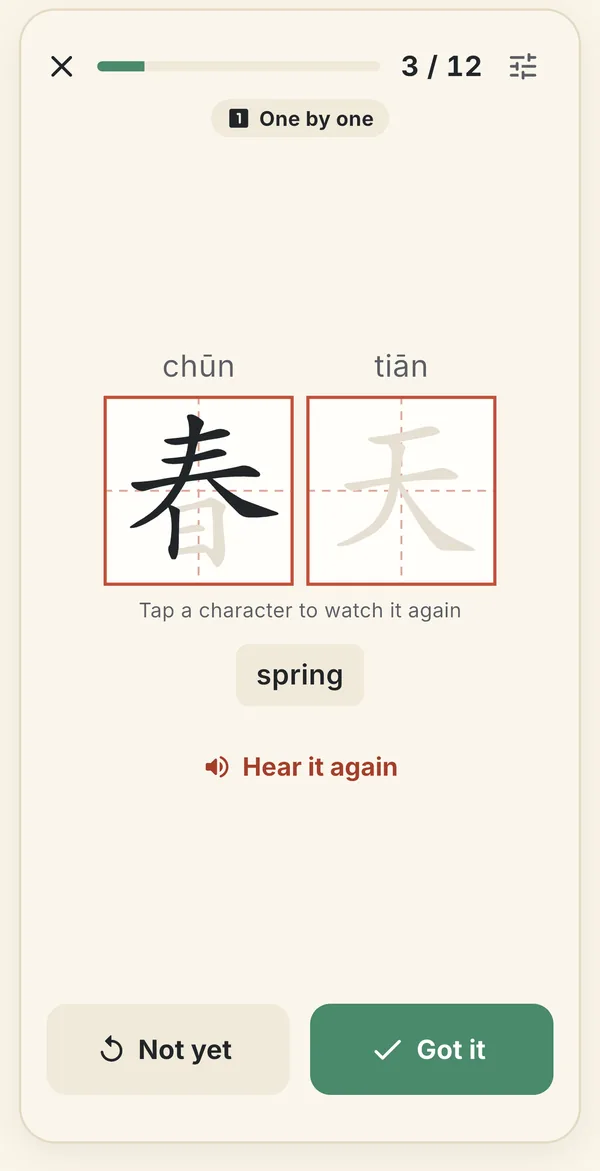
The answer in 田字格 boxes. Mark it Got it or Not yet. Step 3: Choose whose voice reads
Each list can use your own voice recordings or the app voice. English has US, UK, Australian and Singapore voices, and Spell it aloud for a round in the car.
In Dictation settings, Read each word in a sentence says the word, then the sentence, then the word again. The sentence is only heard, never shown on the child's screen.
Step 4: Print a test sheet
For a test on paper, print a Test sheet from the list or from the Week plan. Every page of a test sheet is free.
Step 5: Photograph it for Paper Check (beta)
When the test is written, open Paper Check and tap Take a photo. LingoWonders shows what it read for every answer, and you mark each one Right or Wrong. It does not mark for you.
The photo is sent to our server and Google's Gemini model to be read; nothing is stored on the server. On your phone, the photo stays for 30 days for the check history.
Still stuck? The app has its own Help & FAQ under Settings, or write to lei@appfactory.sg. A real person reads every message.